
Know exactly how well your website is engineered.
EngineeringScore scans your site across security, performance, SEO, accessibility, and reliability, then scores it with a transparent, deterministic method and hands you a prioritized roadmap to fix what matters.




How it works
Three steps. No signup required to get started.
-
Scan your site
Drop in your URL. We automatically check technology, security, performance, and more.
-
Answer one quick question
Tell us whether SEO matters to you. If it doesn't, SEO is skipped and costs no points.
-
Get your score + roadmap
Receive your Engineering Score and a prioritized roadmap of what to fix first.
What we check
Your Engineering Score rolls up 7 categories that quietly shape whether your site is fast, safe, findable, and trustworthy.
Exposed secrets
API keys, tokens and private keys accidentally shipped in your site's JavaScript, where anyone viewing the page source can read them.
Read moreSecurity
Headers, cookies, and known vulnerabilities that put your users and data at risk.
Read moreRuntime Errors
Broken links, console errors, and failures that quietly cost you conversions.
Read moreBest Practices
Modern engineering standards that keep your site maintainable and reliable.
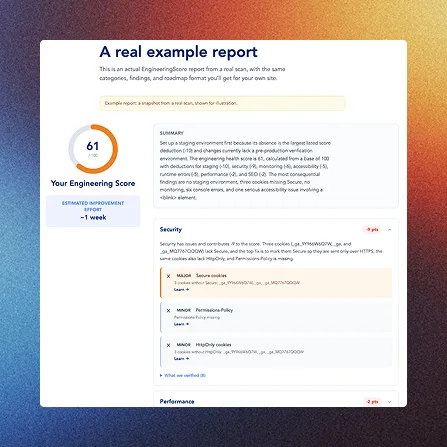
Read moreSee a real report before you scan
EngineeringScore is built by We Do Dev Work, a Bangkok software agency that has shipped web, mobile, and AI products for over 14 years, for clients including True Digital, SCB, Ford, and Bluebik. The same engineers who fix these issues for a living built the checks behind your score.

EngineeringScore is built by We Do Dev Work, a Bangkok software agency that has shipped web, mobile, and AI products for over 14 years, for clients including True Digital, SCB, Ford, and Bluebik. The same engineers who fix these issues for a living built the checks behind your score.
Meet the teamFrom the Learn library
Guides on why each check matters and how to fix it.
Canonical link: what it is and how to add it
A canonical link tells search engines which URL is the authoritative version when the same or near-identical content is reachable at multiple URLs, with tracking parameters, trailing slashes, or http vs https, for example. Without it, ranking signals (links, authority) get split across duplicates instead of consolidating on one page.
Character encoding was not declared: the fix
Declaring <meta charset="utf-8"> tells the browser exactly how to interpret the bytes of the page before it starts parsing content. Without an early, correct charset declaration, browsers have to guess, and a wrong guess turns accented characters, quotation marks, or symbols into visibly garbled text (mojibake).
Title length: how long should a page title be?
Search engines truncate title tags at roughly 50-60 characters (about 600 pixels) when rendering results, and titles under about 10 characters usually mean a missed opportunity to communicate what the page is about. Staying within a sensible range keeps the title fully visible and meaningful.
Redirect HTTP to HTTPS: Nginx, Apache and more
Even after HTTPS is available, visitors and search engines who land on the plain-HTTP URL (from an old link, a bookmark, or a direct type-in) will stay there unless the server actively redirects them. Without that redirect, the insecure version keeps getting used indefinitely, and SEO authority can end up split between the HTTP and HTTPS versions of the same content.
Meta description length: the right range
Search engines display roughly 150-160 characters of a meta description before truncating it with an ellipsis, and descriptions under about 50 characters generally waste the space available to sell the click. Staying in that range keeps the full message visible in results.
Missing doctype: add <!DOCTYPE html>
The <!DOCTYPE html> declaration tells the browser to render the page in standards mode, following the CSS and HTML specifications consistently. Without it (or with an outdated doctype), browsers fall back to "quirks mode", which reproduces decades-old rendering inconsistencies that can make layout and CSS behave unpredictably across browsers.

Ready to see where you stand?
Scan your site and get your Engineering Score with a prioritized roadmap in under a minute, no signup required.